






Spider AF × Google Analytics 4 Integration

Filter Out The Noise and Make Decisions
Based on Clean Data in GA4

Start Free Trial

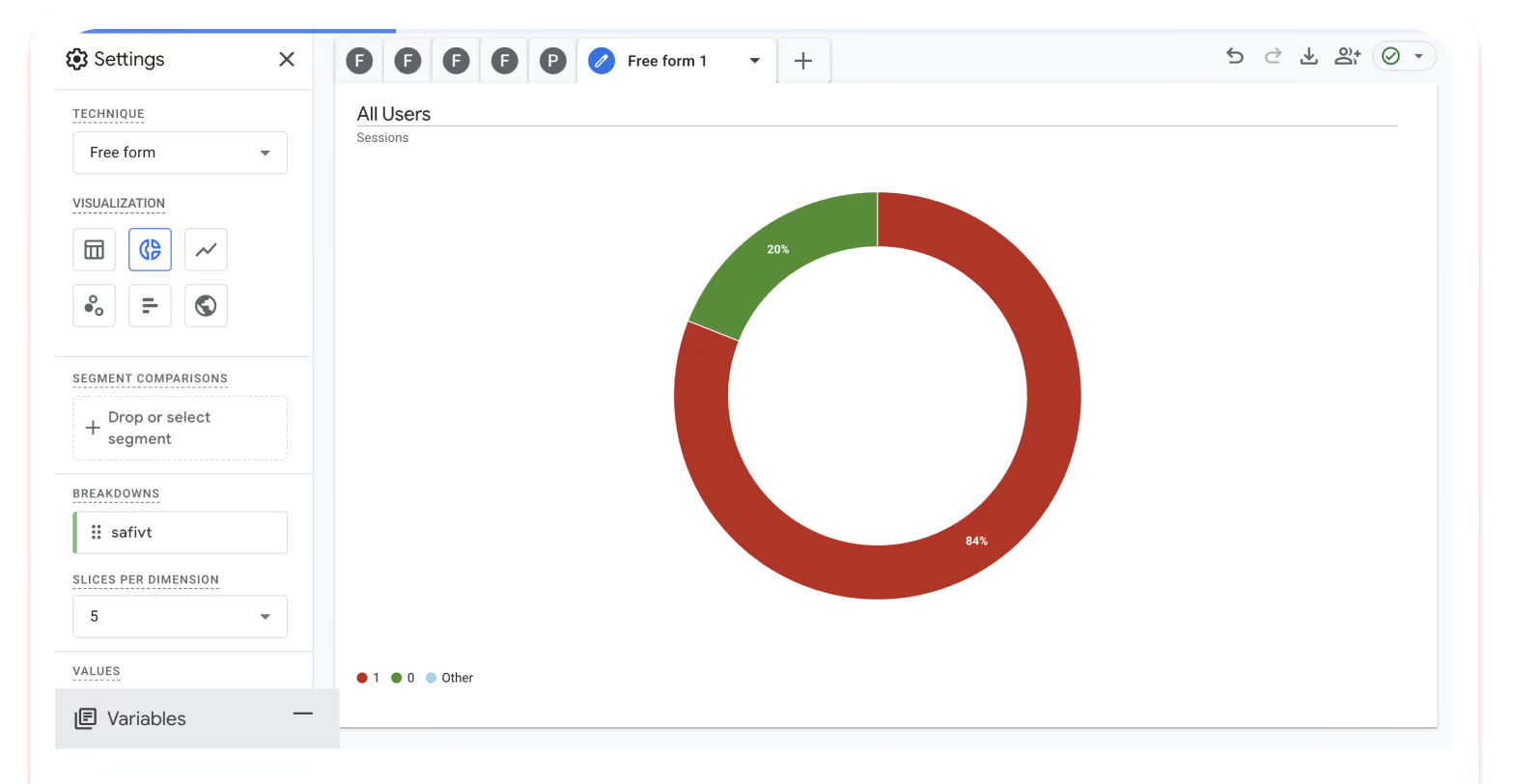
safivt="0"

Valid User (Valid)

safivt="1"

Invalid User (Invalid)

Use GA4 Explorations and Reports to toggle between "Valid" and "Invalid" data for deeper, noise-free analysis.

Simple Implementation

Activate
Enable GA4 Integration
in Spider AF
Analyze
Spider AF flags traffic in real-time.
Sync
Scores sent to GA4 as safivt=0/1
Explore
Compare, explore and optimize with clean data

Is Noisy Data Skewing Your GA4 Insights?
3 Ways It’s Hurting Your Marketing Performance

Skewed KPIs
Stop organic fraud from masking your true ROI.
Standardize traffic quality across all channels to eliminate reporting bias and reveal the true performance of your paid campaigns.
Missed Opportunities
Prevent cutting high-performing channels by mistake.
"Poor performance" is often just a symptom of heavy bot traffic. Filter out the noise to uncover and scale your true growth drivers.
The Automation Trap
Clean data is essential fuel for AI-driven bidding.
Tools like P-Max rely on accurate signals. Remove invalid traffic to ensure your AI optimizes for real human conversions, not bots.

What You Can Achieve with GA4 Integration

Full control within your familiar GA4 interface.
Compare, exclude, and drill down seamlessly.
01
Uncover the "Truth" behind CVR/CPA
Deep dive into the invalid rate per selected metrics.
By aggregating data based only on valid users, you set the right foundation for evaluating your marketing initiatives.
GA4 Reporting Insights:
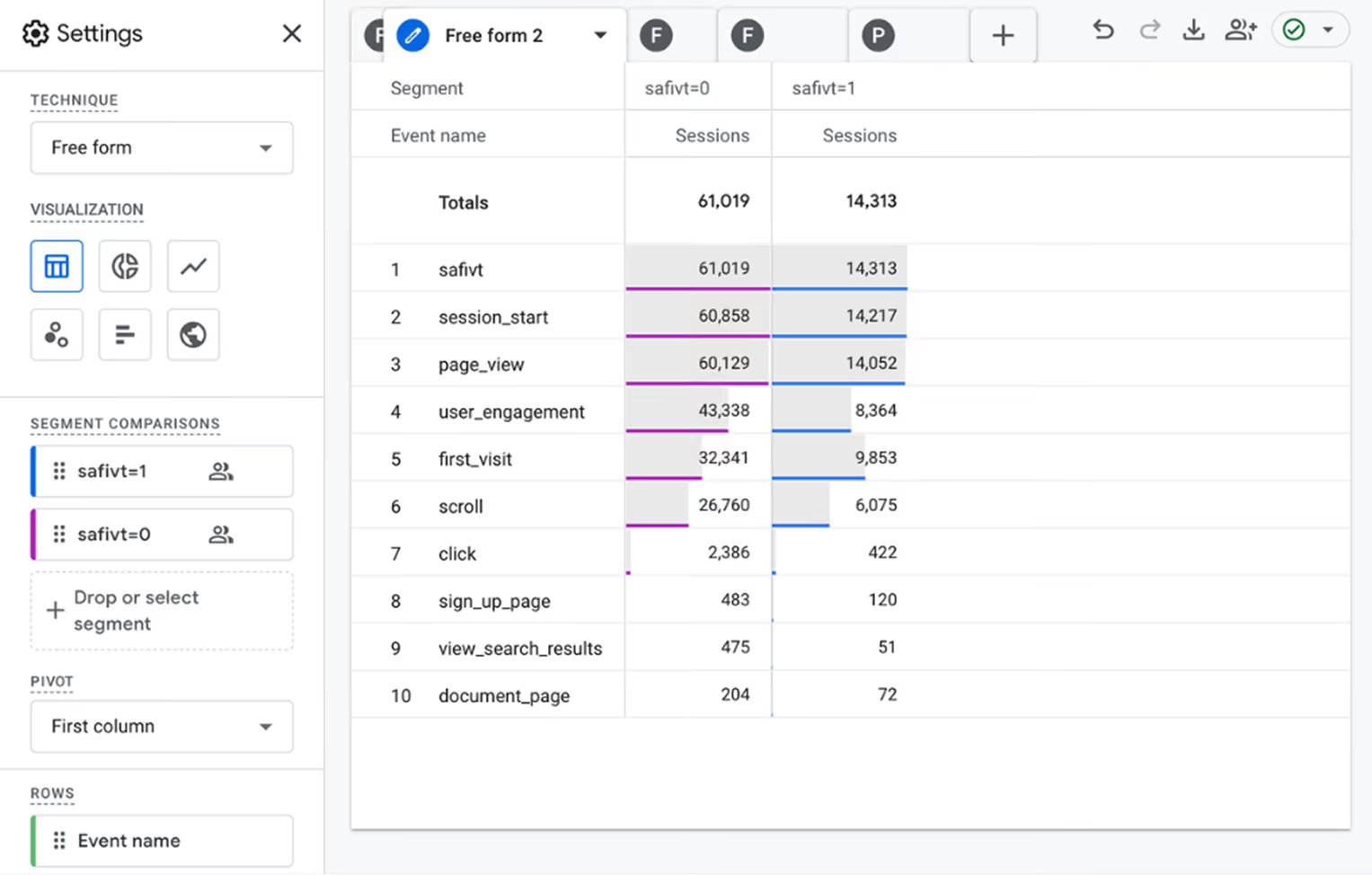
Exploration mode: compare "Valid vs. Invalid" Metrics: Bounce Rate, Session duration, etc
"KPIs look completely different between valid and invalid users"
02
Visualize IVT Rates by Channel
Identify which platforms attract the most fraud.
Gain the insights you need to quickly reallocate budget, refine bidding strategies, and optimize ad placements.
GA4 Reporting Insights:
Dimensions: Source / MediumMetrics: Sessions, Invalid Traffic (IVT) %
"Identify which channels have a high fraud rate, right inside GA4"
03
Eliminate "False Improvements" in Funnel / Exit Analysis
Remove unnatural transitions caused by fraudulent traffic. Viewing valid users only makes improvements "real".
How it looks in GA4
Funnel exploration. Condition: safivt=0 (valid user). Steps: LP → Key Page → Application
"A funnel of valid users only — improvement opportunities become clear"
04
Discover Anomalous Trends by Region & Device
Fraud tends to cluster in specific regions and environments. 不正ユーザー distribution helps you quickly spot anomaly trends.
How it looks in GA4
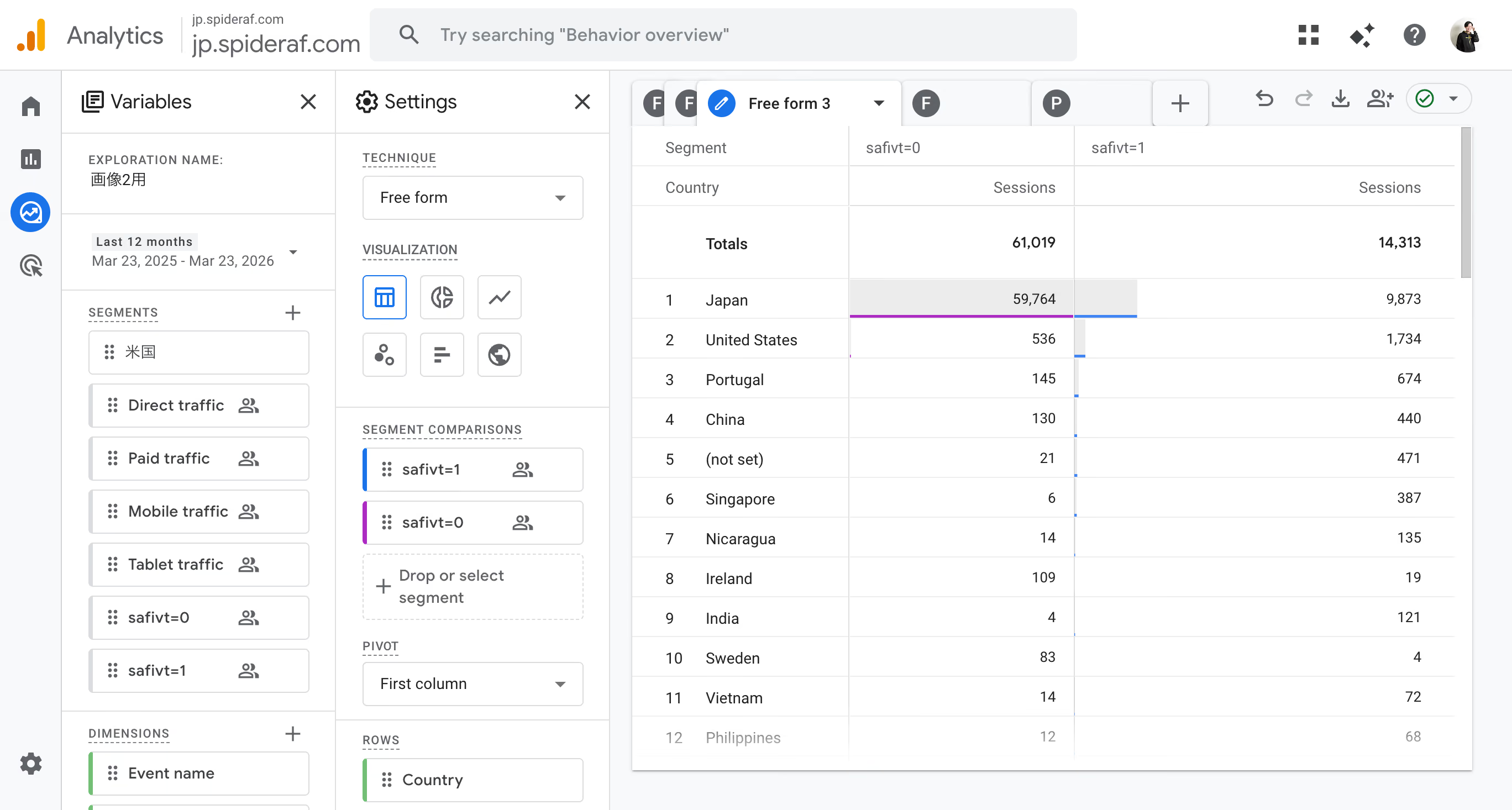
Dimension: Country/City, Device Category. Filter/compare: safivt=1 (invalid user)
"Spot the bias in fraud (safivt=1) and pinpoint potential causes"
05
Extract "Fraud Only" and Analyze Patterns
イベント連打や極端な滞在時間など、不正ユーザー only and visualize warning signs. Helps prioritize countermeasures.
How it looks in GA4
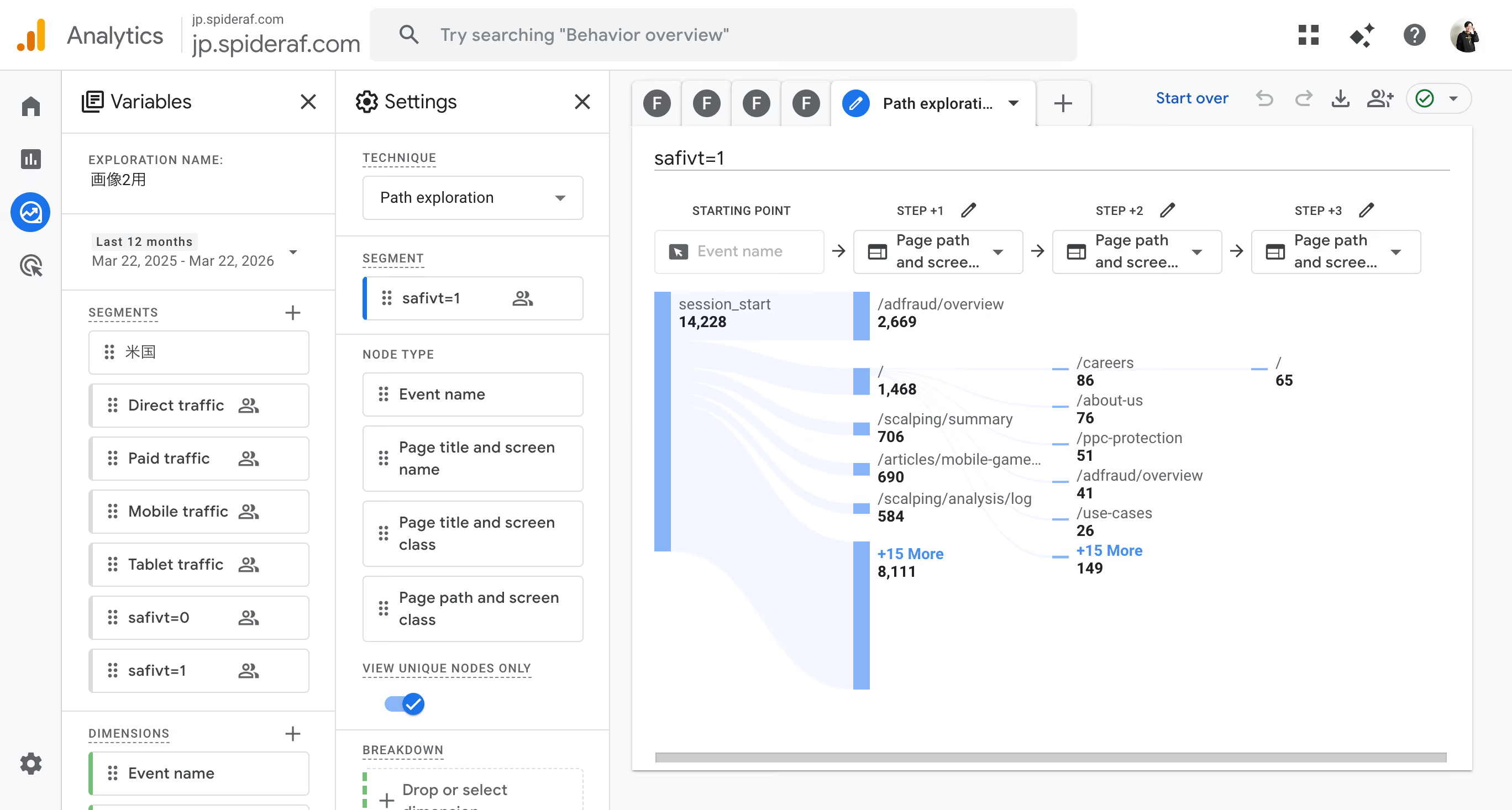
Path Exploration / Free Form: Set safivt=1 (invalid user) as condition. Review "fraud-only behavior".
"Visualize fraud-only behavior. Patterns become clear."
06
Build Audiences for Ongoing Monitoring & Analysis
Create audiences from invalid users. Track fraud trends over time and build a foundation for ongoing monitoring and alert design.
How it looks in GA4
Audience condition: safivt=1 (invalid user). Purpose: Ongoing monitoring, reusable analysis segments.
"Create an 'invalid audience' and track it continuously"

Step-by-Step Integration

Activate the "GA4 Integration" feature within your Spider AF dashboard.
Complete the initial setup for safivt in GTM & GA4
Begin your deep-dive analysis using safivt in GA4 Explorations and Reports.
*Setup steps may differ depending on your tracking design and integration method.

Success Stories

Explore real use cases and see how GA4 integration delivers measurable results

Media & Entertainment

The Challenge:
Frequent manual labor was required to clean "noisy" data from GA4 reports to get accurate engagement metrics.

The Outcome:
Spider AF’s GA4 integration automated the data-cleaning process. By eliminating manual filtering, the team now performs seamless, high-speed analysis using 100% clean data.

Medical & Healthcare

The Challenge:
The clinic needed to unify GA4 signals with Electronic Health Record (EHR) data to visualize ad fraud and maximize high-quality patient acquisitions.

The Outcome:
By integrating GA4, EHR, and Spider AF data, the clinic gained a holistic view of traffic quality. This allowed them to fine-tune their blocking strategies—eliminating wasteful spend while preventing any loss of genuine patient leads.

Pricing

Spider AF ×
Google Analytics 4

$115

/Month

* Requires an active Spider AF Ad Fraud Prevention contract.

Start Your Free Trial

Frequently Asked Questions

Q. Will this change my existing GA4 configuration?

A. Impact is minimal. By simply adding the 'safivt' dimension, you can leverage your existing explorations and reporting structures.

Q. Does this apply to historical data?

A. Data tracking begins from the moment the integration is enabled; it does not apply retroactively to past data.

Q. What is the key advantage for analysis?

A. It goes beyond simple exclusion. By comparing "Valid" vs. "Invalid" traffic side-by-side, you can pinpoint the root causes of fraud and gain deeper insights into your traffic quality.

Q. Are there any types of traffic that cannot be identified?

A. Due to privacy restrictions (such as iOS Safari), certain user traffic may not be categorized. In these cases, the data will be sent to GA4 as “not set”.

See the difference in your GA4 dashboard today

Sync Spider AF detection data directly into GA4 and start making data-driven decisions based on

real, valid human traffic

Start Free Trial