You're weighing Google Ads' built-in protection against a dedicated click fraud tool — and while Google filters the invalid clicks it finds, it doesn't show you where they come from. Google may also credit you for some of what it finds later, so a click a tool flags may already be filtered or credited. But Google won't tell you which sources it filtered, and it won't maintain an IP exclusion list for you.
So is Google Ads click fraud protection enough? It may be for now if your account checks out and someone reviews it regularly. If suspicious clicks keep showing up and you can't trace or stop them, a dedicated click fraud tool can fill that gap. The checks below show you which situation you're in.
Google Ads protects against click fraud on its own: it filters traffic it identifies as invalid before you're billed and issues credits, where appropriate and possible, for invalid activity it finds afterward. That's real protection, and it's the starting point for deciding whether you need anything else.
Invalid traffic covers accidental clicks as well as deliberate abuse, so an invalid click doesn't necessarily mean someone targeted your business. Google says its defenses combine automated filters, machine learning, and manual reviews.
Keep the timing straight. The Invalid clicks column shows traffic filtered before billing, while credits cover activity identified after the billing cycle closes. A credit is a billing adjustment, not a cash refund.
For Search and Performance Max campaigns, the Invalid Activity Credit Report shows credited clicks and amounts. A click and its credit can land in different months, so don't expect the column and the credit report to match month by month.
Keeping these apart stops you from counting already-filtered clicks as wasted spend. For the full process, see how Google handles invalid clicks and credits.
Google also keeps its detection methods and specific invalid traffic sources confidential. You see the totals, but not the sources.
Add extra protection when suspicious clicks keep showing up after you've checked tracking and billing, and you need source details or exclusions you can't maintain by hand. If your checks come back clean and someone reviews the account regularly, staying with Google's protection is a reasonable call.
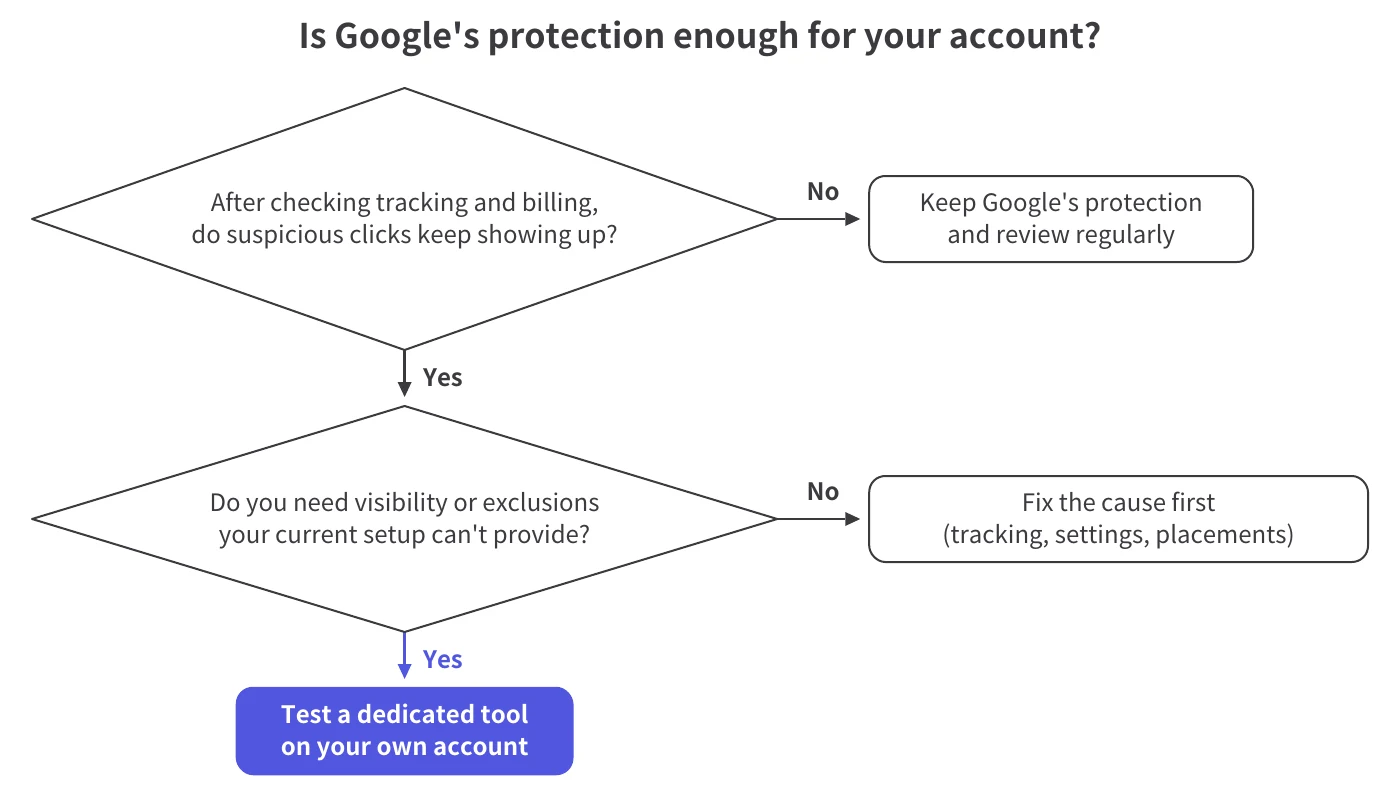
What counts as an unresolved issue? A typical example is a recurring click-to-session gap you still can't explain after checking tracking and billing. That calls for a closer look at where the clicks come from, even before you can call it fraud.
You can keep relying on Google's protection for your paid search campaigns when tracking works, your billing adds up, and someone owns regular account reviews. Base that call on what you've actually checked.
A low invalid click rate doesn't prove your traffic is clean, and neither does a low credit count. The two describe different stages of Google's protection.
Watch for patterns that could change your mind. If performance shifts, can you tie the change to targeting, tracking, or billing? Note anything you can't explain so your next review has a specific question to answer.
You don't need an arbitrary spend threshold for this decision. Keep reviewing, and revisit extra controls when a recurring issue, or the work it takes to investigate, outgrows what your team can handle.
Extra controls are worth evaluating when you can name an action you need but can't do reliably by hand. For example, you might want to flag repeat clicks with your own frequency rules, or get a report of the website placements your ads run on so you can exclude the bad ones.
The workload is often the deciding factor. If someone on your team keeps investigating the same sources, updating exclusions by hand, and checking whether the changes reached the ad platform, a tool that automates exclusions can cut that workload. For agencies, it's also easier to show a client the operational benefit than to argue that every flagged click was wasted spend.
Define what good evidence looks like before you start a trial: a recurring source you can inspect and an exclusion you'd want applied. Then check that the tool supports the ad platforms you use.
Once exclusions are switched on, check how much manual work they save and what they change, including any effect on legitimate inquiries. That's how you decide whether the tool earns a permanent place in your workflow.
Before you pay, check whether the activity was billed, whether your reports count the same events, and which capability you actually need to add. Those three checks give you a fair basis for judging what a tool finds.
For account settings and setup steps, see Google Ads settings and click fraud prevention steps. Those settings are worth getting right either way, but they won't tell you whether another tool adds something you need.
Depending on the product, a third-party ad fraud tool can show where flagged clicks come from, apply its own detection rules, and push exclusions to your ad accounts. Its value depends on whether those capabilities help you trace recurring activity and keep the controls you need in place.
The core benefit is visibility you can act on. Google keeps its detection methods and specific invalid traffic sources confidential, so its reports tell you how much was filtered, not where it came from. A dedicated tool can give you its own read on the traffic it sees, such as the IP addresses that keep showing up behind flagged clicks.
It isn't a window into Google's decisions, and it doesn't prove Google charged you for clicks it should have filtered. You can see which sources keep triggering flags and decide whether an exclusion fits your business.
Google Ads does let you exclude IP addresses yourself, but you have to find them first and maintain the list. Depending on the tool, you can set repeat-click thresholds, review placement reports, and have supported exclusions pushed to your ad accounts automatically.
Coverage varies by tool. Confirm what it reports, which exclusions it can apply, and where those exclusions take effect.
No tool can guarantee Google Ads credits, catch every invalid click, or promise that exclusions will never affect a legitimate user. A detection count also can't tell you how many extra clicks a tool prevented or how much money it saved.
Google's help page puts it plainly: "Google doesn't analyze or validate third-party data as part of invalid traffic investigations." Google may ask for your web server logs during its own investigation, but that's different from accepting a vendor's fraud verdict.
Exclusions need review, too. Several legitimate users can share one IP address. Track valid inquiries alongside blocked activity, and look into any unexpected change.
Login attacks, scraping, and firewall-style bot management are outside Spider AF PPC Protection's scope. Ad exclusions aren't a barrier around your whole website.
Form spam happens at a separate layer, after the click. Google recommends form safeguards such as reCAPTCHA, double opt-in confirmation emails, and server-side input validation.
Spider AF PPC Protection detects invalid clicks in real time and pushes IP and audience exclusions back to Google, Meta, and other major ad platforms. It fits advertisers who want to keep exclusions current without doing it by hand.
Repeat-click rules, IP and network blocking, and location-based exclusions let you set rules for which traffic to stop, on top of Spider AF's automatic detection.
The free trial shows you what Spider AF would find before anything is blocked. During the 14-day trial, you add the Spider AF tag to your landing pages and connect your ad accounts, and Spider AF measures invalid traffic across Search, Performance Max, Display, and social campaigns without blocking anything. You can see whether a recurring source keeps showing up behind the flags. Blocking starts when you move to a paid plan, and from then on, exclusions update automatically.
In one of our case studies, a Vienna emergency locksmith ran Google Ads aimed at a single district of the city, yet Spider AF's reporting showed clicks coming from all 23 districts. He went on to cut invalid ad clicks by 90%. That figure covers one business's invalid ad clicks; it isn't a spend reduction or a result to expect for your account. For the details, see how a Vienna locksmith reduced invalid clicks.
If suspicious activity persists, measure the invalid traffic in your own account. Spider AF's free trial lets you check its findings against your own account data instead of industry averages. Because it doesn't block traffic during the trial, you can review every flag before you decide whether to turn blocking on.
If your checks come back clean and regular reviews are manageable, staying with Google's protection is still a reasonable choice. Revisit it if suspicious activity returns or the exclusion work piles up.
Factor Google's filtering and billing records into that review. Click fraud protection is worth it on top of Google's when it lets you name a recurring source and keep the exclusions you need in place.
If suspicious clicks keep showing up after you've checked tracking and billing, a dedicated click fraud tool is worth adding, because Google's filtering doesn't show you where invalid clicks come from. A tool can show you those sources and keep your exclusions updated automatically. Spider AF PPC Protection's 14-day free trial measures invalid traffic in your account without blocking anything, so you can see what it finds first.
No, a high invalid click rate on its own doesn't mean Google's protection is failing. If the rate comes from Google's Invalid clicks column, it counts clicks Google already filtered before billing, and a tool's rate can include those same clicks. Either way, review it alongside your billing records and any credits before you treat it as a loss.
Tools can report more invalid clicks because they apply different criteria and may count clicks Google already filtered. Google notes that third-party tools "often flag invalid traffic that Google defenses already detected and filtered." A dedicated tool can still help you identify recurring flagged sources and manage exclusions, though its count doesn't prove you paid for those clicks.
No, third-party tools can't guarantee Google Ads credits, because Google decides whether credits apply and doesn't analyze or validate third-party data in its invalid traffic investigations. A tool's report can help you organize evidence, but it doesn't entitle you to a billing adjustment.
Not by itself: click fraud protection works on ad clicks, while fake leads and form spam happen after the click and need form-side safeguards. Google recommends reCAPTCHA, double opt-in confirmation emails, and server-side input validation for lead forms.

Crecimiento de MFA, riesgos de fraude impulsados por IA y cómo los principales anunciantes protegen sus presupuestos. PDF gratuito.