As of November 2026, the Google, Meta, and industry materials we reviewed don't say whether AI agent clicks count as invalid traffic. Google removes invalid traffic found before your billing cycle ends and may issue credits for traffic found later. A visit alone proves neither a click nor a charge; check ad reports, billing, and server logs before blocking.
An unfamiliar visit in your reports doesn't tell you whether an AI agent clicked an ad — or whether you paid for it. Those are separate questions, and each needs different evidence.
This article focuses on Google Ads billing and uses Google's Campaign Manager 360 (CM360) definitions as context. For Meta and Microsoft Advertising, check each platform's official guidance.
The practical starting point is your own records: what reached your site, what Google recorded as an ad interaction, and what appeared in billing. If your records don't support a connection, treat it as unconfirmed.
None of the documents we reviewed show whether or how often AI agents click paid ads. Google's and OpenAI's documentation describes browsing at a user's request, not ad clicks.
For this article, AI agents are assistants or browsers (sometimes called agentic browsers) that navigate the web and act at a user's request. The distinction from automatic crawling matters when you interpret a visit.
Google says Google-Agent is used by agents on its infrastructure to “navigate the web and perform actions upon user request.” Its documentation also lists the IP ranges those agents use.
OpenAI describes ChatGPT-User as supporting certain user actions in ChatGPT and Custom GPTs. It says ChatGPT-User “is not used for crawling the web in an automatic fashion.” OpenAI's documentation doesn't say ChatGPT-User is the identifier for ChatGPT agent or the ChatGPT Atlas browser.
These descriptions explain user-requested activity. Neither establishes that a particular request came from a paid ad.
A server log shows a request to your site. Your ad reports record ad interactions. Billing tells you what you were charged or credited.
Treat these as separate records to compare. An AI service in your referrer data isn't proof that someone clicked an ad, and an agent name in a server log doesn't tell you whether you were charged.
For background on automated visits, see our guide to what bot traffic is and how to spot it.
As of November 2026, we found no official position from Google, Meta, or industry groups on whether AI agent clicks count as invalid traffic. Google Ads defines invalid traffic as traffic that “doesn't represent genuine interest in your business,” but the documents don't explain how that applies to a user-directed agent.
Google's invalid-click examples include this wording:
“Automated traffic: Clicks from automated tools, bots, or other deceptive software.”
That is an existing invalid-click description, not an explicit ruling on AI agents acting at a user's request. The same page says advertisers aren't charged for invalid clicks or impressions. It doesn't say which interactions by user-directed agents count as invalid.
Campaign Manager 360 separates general invalid traffic (GIVT) from sophisticated invalid traffic (SIVT). Its Known crawler, Automated browsing, and Manipulated behavior categories address different conditions: disclosure, user involvement, and user consent.
Involvement and consent are separate concepts. A user's participation in a browsing task doesn't, by itself, answer whether the user consented to a particular ad interaction.
For broader background, see types of invalid traffic and how to prevent them.
We read these definitions as leaving several questions about user-directed agents open. An agent that declares itself isn't automatically GIVT, and one that doesn't declare itself isn't automatically SIVT. A user's instruction also doesn't automatically make an ad click valid.
The table and diagram below present our interpretation of selected definitions, not Google's classification or billing policy for AI agents.
Table 1. What these Google definitions tell us about AI agent clicks
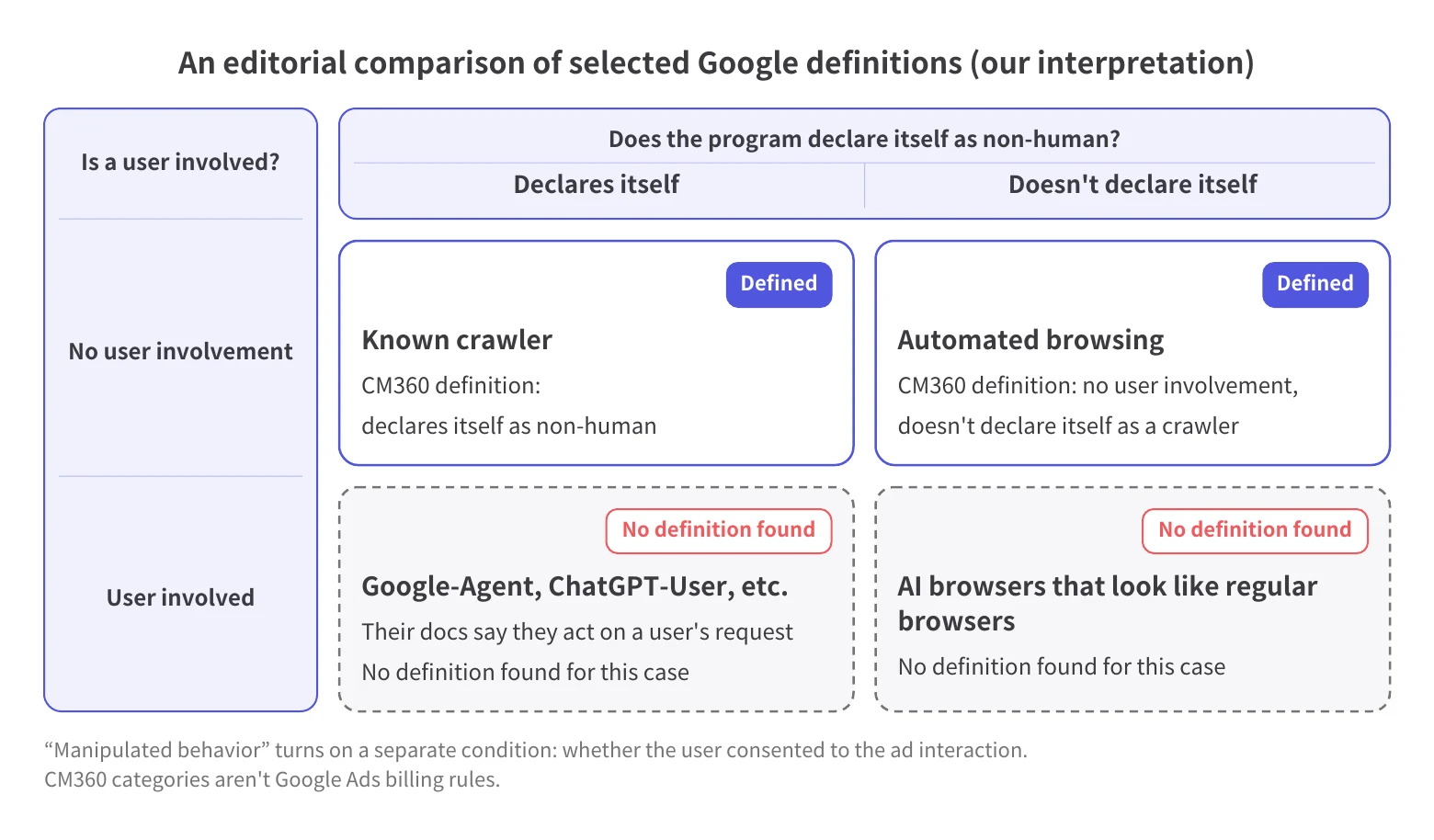
CM360 categories aren't Google Ads billing rules. Use this comparison to understand the unresolved questions, not to assign a charge or credit.
Google doesn't charge for invalid traffic it removes before your billing cycle ends, and it may issue a credit for invalid traffic it finds after you receive an invoice. According to Google Ads Help, invalid traffic detected before your billing cycle ends is removed from your campaign metrics and billing, and post-invoice credits apply “where appropriate and possible.”
The Invalid clicks column in your campaign reports shows traffic Google's systems already filtered. Google doesn't charge you for those clicks.
Treat that column as evidence of filtering, not as a list of suspicious clicks awaiting a refund. You shouldn't expect an additional credit for clicks that were never charged. The column also doesn't tell you whether the filtered clicks came from AI agents.
If suspicious clicks may have been billed, follow Google's invalid-traffic investigation process. Google's guidance says its specialists evaluate traffic from the last 60 days.
We suggest gathering dates, time zones, affected campaigns, landing pages, any click identifiers you have (such as GCLIDs), relevant logs, and billing records. That's our checklist, not Google's list of required fields.
A discrepancy with a third-party tool doesn't prove a billing error. Google says it can't evaluate third-party reports because it doesn't know their detection criteria. Explain what your records show without assuming a tool's flag guarantees a credit.
No. Google says its filters “cannot block traffic from your site because they run after an ad serves” and “can't prevent all invalid leads.” Review site activity and lead quality separately from invalid-click reporting and billing.
Google explains that bots or users can still submit forms even when it identifies the ad interaction as invalid. A filtered click doesn't mean the resulting activity on your site was blocked.
Check the inquiries recorded on your site and in your CRM. Whether you received a billing adjustment is separate from whether the lead is usable.
Google's guidance says “Google Ads reports might show different data than your website analytics.” Google removes filtered invalid clicks from reports, while your analytics might still record the visit.
A mismatch alone doesn't mean you paid for an unfiltered click or that an AI agent visited. Treat the reporting gap as one question and who the visitor was as another. For analytics-specific work, see how to filter bot traffic in GA4.
Compare ad reports, billing, and server logs for the same date range and time zone, and treat anything your records don't connect as unconfirmed.
Start with the affected campaigns and dates. Review the Invalid clicks column alongside campaign reporting, invoices, and any invalid-traffic credits.
Keep already-filtered clicks separate from suspicious activity that may have been billed. This prevents you from requesting a credit for clicks Google already excluded. If your billing records don't show a charge tied to the activity, mark it unconfirmed.
Ask whoever manages your website to review available timestamps, requested pages, IP addresses, and user agent strings. A user agent string is the text a request sends to identify its browser or software.
For requests that identify themselves as Google-Agent, compare the IP addresses with Google's documented ranges in user-triggered-agents.json.
Note any ChatGPT-User requests in your logs and interpret them using OpenAI's description of ChatGPT-User. Don't treat that name as an identifier for ChatGPT agent or Atlas.
Next, we suggest lining up timestamps, landing-page URLs, and any available click identifiers. Ask your team which records support a connection between a particular visit and an ad interaction.
An agent name or a matching Google-Agent IP range isn't enough to connect a visit to an ad interaction.
Review the resulting inquiries with the team that handles them. Note which leads they could use, which they rejected, and why.
Keep those observations alongside the click and billing evidence. Poor lead quality warrants investigation, but it doesn't identify an AI agent or establish eligibility for a credit.
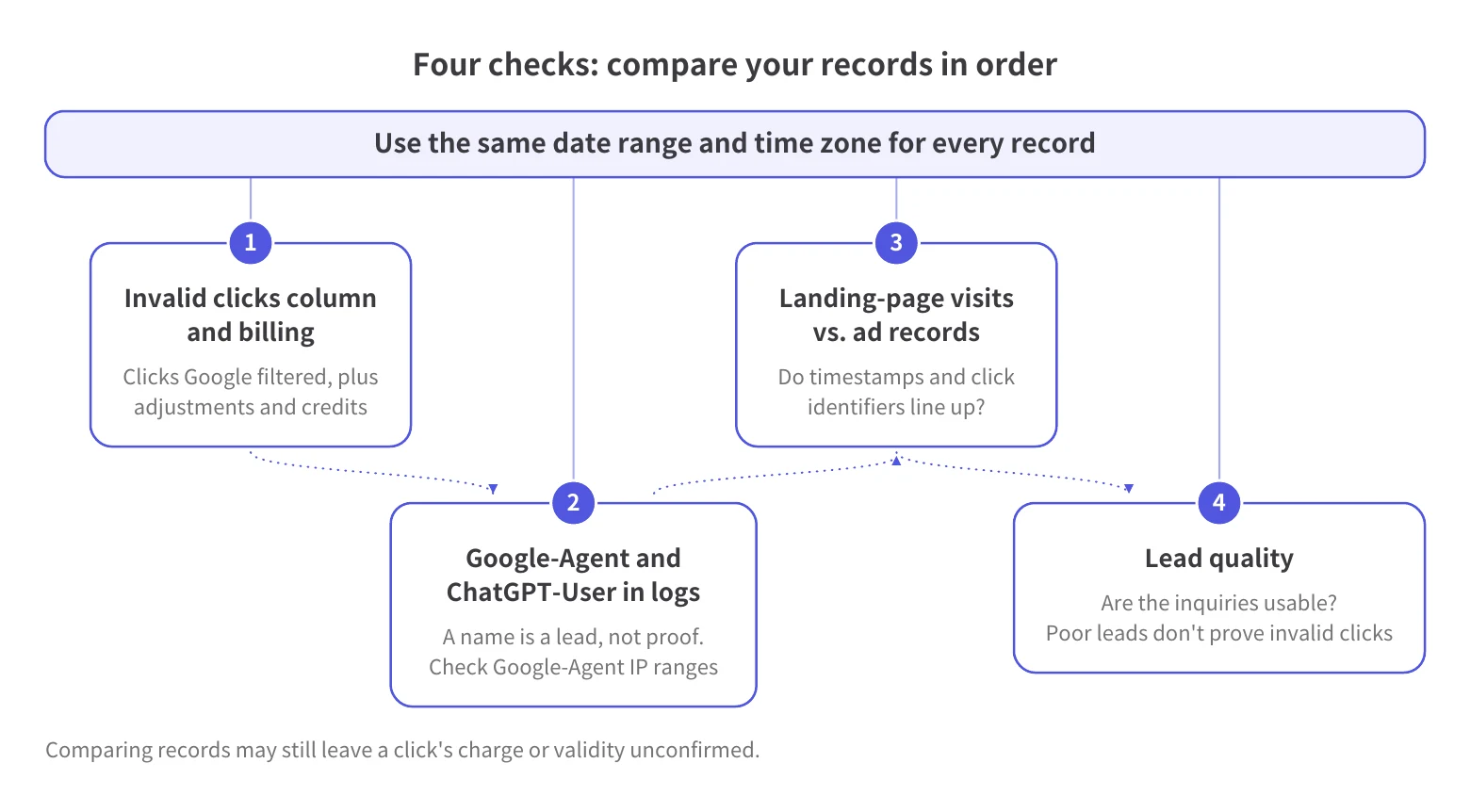
Review ad records, billing, and lead quality before deciding whether to block. An agent name alone doesn't tell you whether an interaction is invalid.
Table 2. Match your next step to the evidence
Before applying a blocking rule, ask your team to state the evidence supporting it and the activity it would affect. If an agent name is your only evidence, keep investigating before you block anything.
We analyze IP addresses, user agent data, and browsing patterns to detect and block invalid clicks and bot traffic in real time. We don't offer a dedicated AI-agent identification feature.
Our vision is to “Define the Global Standard for Agent Trust.” In this article, we stick to what advertisers can verify about AI agent visits, ad clicks, and billing.
Our dashboard breaks invalid traffic into these categories: Bot, Data Center, Geo Masking, Duplicate IP Clicks, Spoofed Devices, and Invalid User Agent.
You can use that breakdown to review your campaigns and compare the findings with Google's Invalid clicks column, billing, and your logs. These categories aren't AI-agent labels or a way to distinguish a user-directed agent from a human.
For the broader decision about additional protection, see our guide to whether Google's click-fraud protection is enough.
Our two-week trial provides full access to the Elite plan and analyzes your site without activating blocking features. Blocking starts on a paid plan.
Use the trial to see your own invalid-traffic breakdown.
The documents we reviewed describe user-requested web activity, but they don't show whether or how often agents click paid ads. A visit alone doesn't prove an ad click or a charge. Check your ad reports, billing, and server logs before drawing a conclusion.
As of November 2026, the Google, Meta, and industry materials we reviewed don't say whether AI agent clicks should be classified as invalid traffic. Google Ads defines invalid traffic as traffic that doesn't represent genuine interest in your business. Those materials don't explain how that definition applies to agents acting at a user's request. An AI agent label alone isn't enough to call a click valid or invalid.
Not automatically: Google may issue a credit if it detects invalid traffic after you receive an invoice, but an AI agent label alone doesn't show that a click qualifies. Credits apply “where appropriate and possible.” If Google detects invalid traffic before your billing cycle ends, it removes that traffic from your campaign metrics and billing.
Compare ad reports, billing, and server logs for the same date range and time zone, using any click identifiers and landing-page records you have. For requests that identify themselves as Google-Agent, compare their IP addresses with Google's documented user-triggered agent IP ranges. An agent name or IP match alone doesn't prove an ad click or a charge.
We don't offer a dedicated AI-agent identification feature. We analyze IP addresses, user agent data, and browsing patterns to detect and block invalid clicks and bot traffic in real time. You can compare your campaign's invalid-traffic breakdown with Google's Invalid clicks column, billing, and your logs. Our two-week trial includes full access to the Elite plan and analyzes your site without activating blocking features; blocking starts on a paid plan.

Crecimiento de MFA, riesgos de fraude impulsados por IA y cómo los principales anunciantes protegen sus presupuestos. PDF gratuito.