You're paying for clicks that don't convert — but choosing protection starts with knowing what your account actually needs. There's no single answer to "what is the best click fraud protection software?" Start with what Google already filters, compare tools against seven criteria, and test the fit on your own account.
Most "best software" lists are written by vendors that rank themselves first. That leaves you with a sales pitch when you need a buying framework. Your decision should reflect the platforms you use, the evidence you can review, and the work you want to reduce. A free trial should help you judge those things before you commit to a subscription.
Google Ads filters traffic it identifies as invalid before you're billed and may issue credits for invalid activity it finds later. Check what that protection already covers before you evaluate an extra tool.
According to Google's invalid traffic guidance, later credits are issued where appropriate and possible. They adjust your bill; they aren't cash refunds. Google also keeps its detection methods and specific invalid traffic sources confidential.
Keep Google's "invalid clicks" separate from deliberate click fraud. Invalid clicks include accidental clicks, and poor lead quality alone doesn't prove fraud.
For Search and Performance Max campaigns, the Invalid Activity Credit Report shows credited activity. You can also exclude IP addresses yourself: campaign-level exclusions are capped at 500 per campaign and aren't available for Performance Max, while an account-level list applies across your campaigns. Either way, you're on your own to find those addresses and keep the list current.
To judge the gap in your own account, read about whether Google's built-in protection is enough. For a closer look at the process, see how Google detects invalid clicks and issues credits.
Click fraud protection is worth it when it fills a specific gap at a cost you can justify. Name the missing capability before you compare subscriptions.
That might mean identifying recurring sources of flagged clicks, keeping exclusions updated without manual work, covering several ad platforms, or reducing investigation time. Weigh your monthly ad spend, CPC, and industry against the manual review hours a subscription could replace.
Fraud-rate figures vary because reports cover different traffic, definitions, and measurement methods. Spider AF's 2026 Ad Fraud White Paper estimates global losses from ad fraud in 2025 at over $32.6 billion. That's an industry-wide estimate, not a loss measured in any one account.
The first-half 2026 edition reports an observed ad fraud rate of 5.58% across 4.006 billion clicks Spider AF measured between January 1 and June 30, 2026. Treat these report figures as context, not as your account's fraud rate or your expected savings.
Don't multiply flagged clicks by your average CPC and call the result wasted spend. The count doesn't show which clicks you were charged for, and Google may already have filtered some of them.
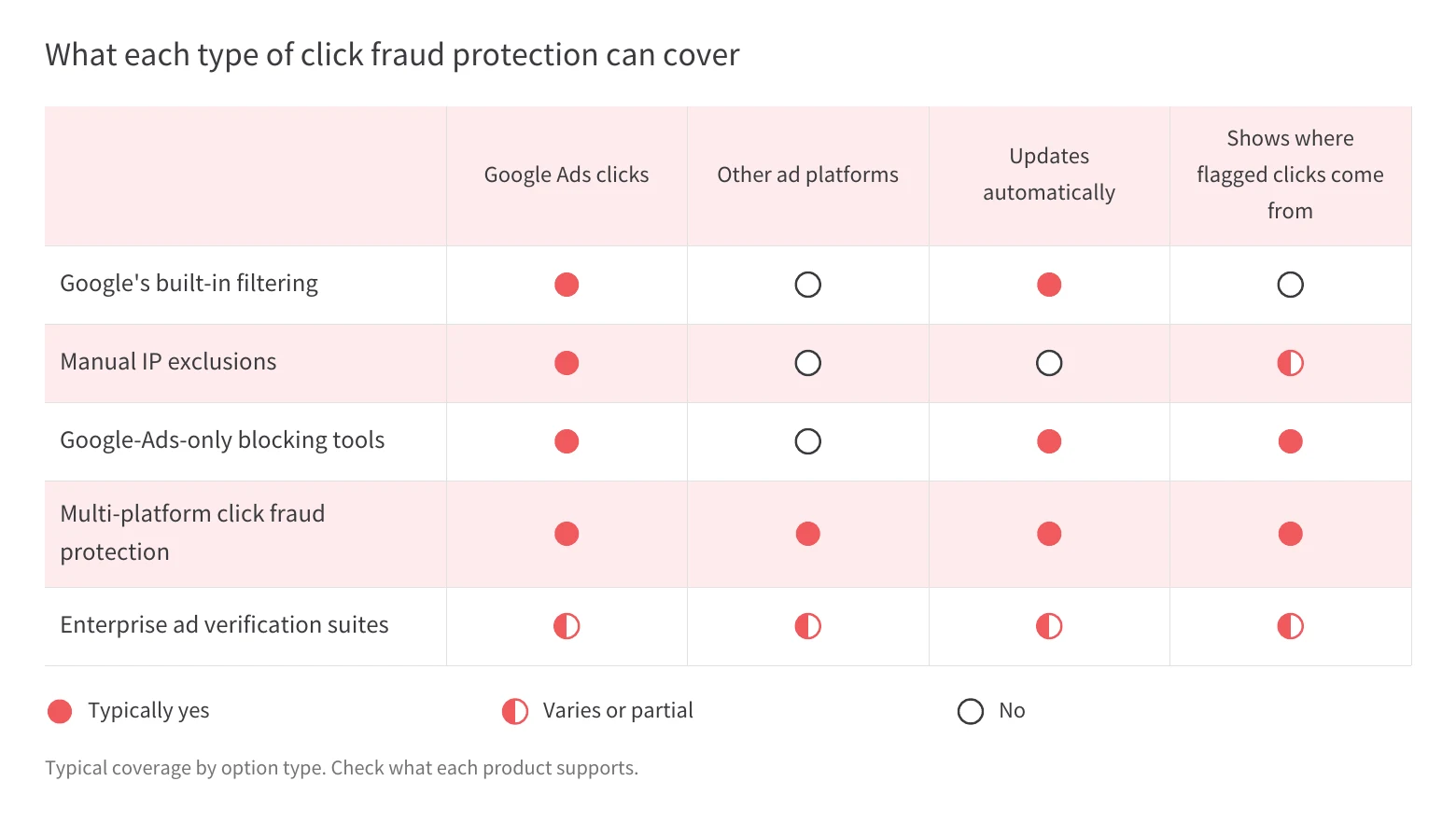
Choose the type of protection that matches your platforms and the work you need to reduce. These options can be combined, and their coverage overlaps.
Consider adding a dedicated tool to Google's filtering if it addresses a gap in your account. Use the table to narrow your shortlist, then check which exclusions each platform supports and how much effort they take. If you're looking for the best click fraud protection for Google Ads alone, compare Google-Ads-only tools and multi-platform protection on the same criteria, and consider whether you'll add other ad platforms later. If your problem is bot traffic beyond ad clicks, such as site visits or analytics, see how to choose the right type of bot detection tool.
Whether a vendor calls it click fraud protection, prevention, or detection software, evaluate it on seven criteria that connect detection to your day-to-day decisions. Ask for a specific answer for each ad platform you use.
Treat a missing answer as something to resolve during the trial. Score each tool against the criteria and your actual needs, and ask vendors to back up their claims with your own data. No tool can guarantee a credit, because the ad platform makes that decision.
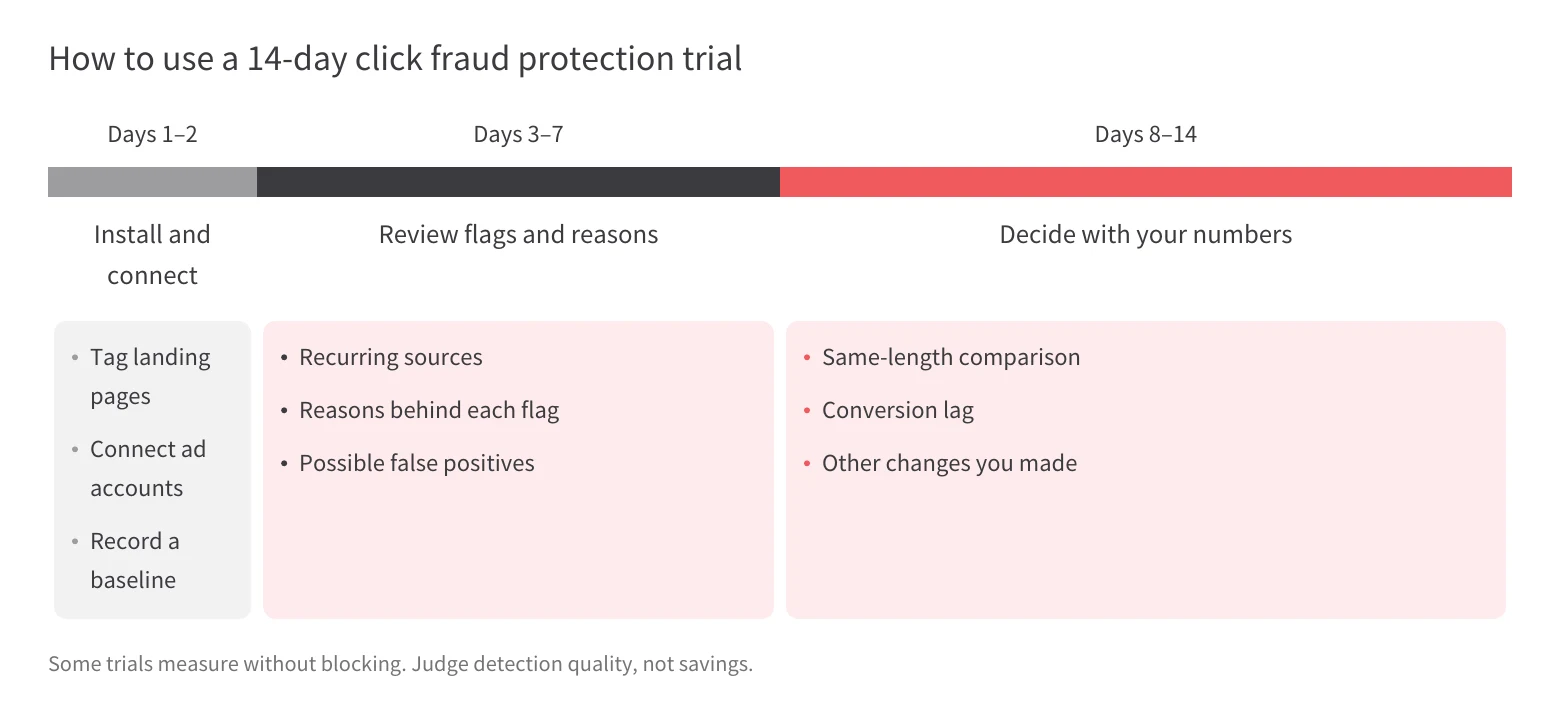
Use a 14-day trial to test detection, reporting, and the work it takes to act on findings. Decide in advance what evidence would justify the subscription for your account.
Install the tag on every landing page your ads use, then connect each platform you want covered. Check that the setup matches the accounts and pages you meant to evaluate.
Record a baseline: date range, spend, clicks, conversions, and CPA. Note any bid, budget, creative, or tracking changes you plan to make. You'll need that context when you decide whether a performance change has anything to do with traffic quality.
Review the reasons behind flags, and look for recurring IP addresses, placements, locations, or devices. A large count tells you little without those details.
Check whether flagged activity could include your office network, existing customers, or a legitimate partner. Use how to spot fake clicks in your reports to structure that review, and ask how you'd reverse an exclusion that catches a real prospect.
Some trials, including Spider AF's, measure without blocking. During those trials, you're judging detection quality and reporting, not savings from exclusions.
Compare CPA and conversions only across equal-length periods with enough volume to interpret the results. Account for conversion lag, and note changes to bids, budgets, creatives, and tracking. If the evidence is still thin, treat your conclusion as uncertain.
Decide which traffic you'd actually want blocked and whether the reports would save investigation time. Write down open questions about exclusions, reporting, and cost before the trial ends.
Spider AF PPC Protection detects invalid clicks in real time and pushes IP and audience exclusions back to Google, Meta, and other major ad platforms. You can add your own rules on top of automatic detection, then review the traffic being flagged.
Available controls include repeat-click rules, IP and network blocking, and location-based exclusions. Match those settings to the patterns you've reviewed, and confirm which controls apply to each connected platform.
Plans scale with the number of monthly protected ad clicks. Check the Spider AF pricing page for current limits.
The free trial lasts 14 days. You add the Spider AF tag and connect your ad accounts. Spider AF then measures invalid traffic without blocking anything, so you can inspect the findings first. Blocking starts when you move to a paid plan, and no credit card is required for the trial.
A Vienna emergency locksmith targeted a single district but saw clicks from all 23 districts of the city. Using Spider AF, he identified and blocked the outlying traffic, which was confirmed to be coming from bots. His invalid clicks have dropped by 90%, and his cost per acquisition is now around €12. Read how a Vienna locksmith cut 90% of invalid clicks for the full story, and treat it as one advertiser's result, not a forecast for your account.
Spider AF can show you where flagged clicks come from and keep exclusions updated. It can't guarantee ad platform credits, though. Google decides whether to issue credits and doesn't analyze or validate third-party data in invalid traffic investigations. Use the reports to explain patterns and decide on exclusions, and keep billing adjustments separate from detected traffic.
For agencies, the decision depends on whether a tool fits each client's accounts and your team's review process. Confirm how access, costs, and reporting work before you roll it out across clients.
Spider AF's dashboard shows invalid click volume, fraud category breakdowns, and campaign detection rates on a single screen, and its logs can be downloaded as CSV files for recurring reviews. A free diagnostic report shows invalid click rates and estimated losses in an advertiser's account, so you can use it in client proposals. Spider AF also offers a partner program for agencies, including reseller and referral models. To frame client conversations, see the ad fraud risks agencies face with client budgets.
You can make this decision by matching protection to your accounts, budget, and review workload. Begin with what Google's own filtering already handles, then name the specific work or visibility you're missing.
Match the option type to your platform mix, then score the tools on your shortlist against the seven criteria above, and ask for a demonstration wherever an answer is vague.
A free trial should help you assess those answers against your own traffic: look for detection reasons you can understand, consider which exclusions you'd want to apply, and decide whether you'd actually use the reports. Flagged click counts aren't billing adjustments or proof of savings.
For practical next steps, follow this step-by-step guide to preventing click fraud. If Spider AF makes your shortlist, use its trial to inspect invalid traffic and reporting before you decide whether paid blocking fits your needs.
There isn't one best tool for every account. Compare platform coverage, blocking, false-positive handling, evidence, pricing, trial terms, and effort. Spider AF PPC Protection is built for advertisers using Google, Meta, and other major ad platforms who want exclusions kept up to date.
Google filters invalid clicks before billing and issues credits, where appropriate and possible, for invalid activity it finds later. Credits adjust your bill rather than paying cash back. For Search and Performance Max campaigns, the Invalid Activity Credit Report shows credited activity.
Campaign-level IP exclusions are capped at 500 per campaign, and any exclusion list needs ongoing upkeep. Bots and other fraud sources can rotate IP addresses, and a shared IP can include real users. IP exclusions alone rarely keep up.
Pricing is usually based on flat tiers or a share of ad spend. Spider AF PPC Protection starts at $150/month billed monthly, or $120/month billed annually, with a 14-day free trial.
It depends on your spend, CPC, and industry. During a trial, look at detection reasons, possible false positives, the subscription cost, and changes in conversions. If the trial doesn't block traffic, you're evaluating detection and reporting rather than savings from blocking.

MFA growth, AI-driven fraud risks, and how top advertisers are protecting their budgets. Free PDF!



.png)